
Skip to content
GorZesk
Pricing
Log InFree monthStart your free monthWatch demo
  • Main navigation

  • Pricing
  • Log In

How it works

How GorZesk works

Twelve steps cover setup and daily operation: what you do, what your customer sees, what needs your approval and what you need first.

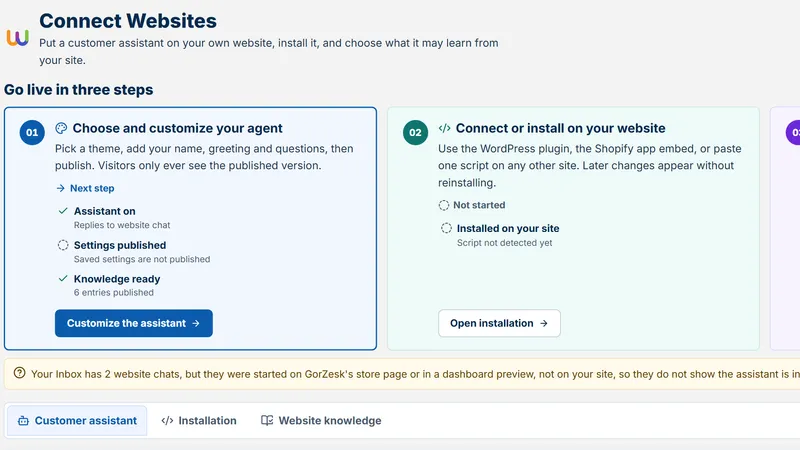
GorZesk workspace setup page with demonstration data

Setup and operation

  1. 1.Account and workspace

    What you do
    Sign up once with your Pinevon account, then create your business workspace. Everything else in GorZesk belongs to that workspace.
    What your customer sees
    Nothing yet.
    What needs your approval
    None. You are the owner of the workspace you create.
    What you need
    An email address and password (or a supported social or passkey sign-in).
  2. 2.Business profile

    What you do
    Name, web address, logo, description, country, currency, default language and timezone. These are settings, never assumptions.
    What your customer sees
    Your business name and logo in the chat window; replies in the language you chose (and in the customer's own language when they write in one).
    What needs your approval
    None.
    What you need
    A business name and a short web address (lowercase letters, numbers and hyphens).

    Your Account

  3. 3.Team and permissions

    What you do
    Add team members as owner, admin or staff. Only the owner manages membership; staff can read but not change business records.
    What your customer sees
    Nothing.
    What needs your approval
    Membership changes are owner-only and enforced on the server.
    What you need
    Each person needs their own GorZesk account; you add them by account ID (invite-by-email is not available yet).

    Your Account

  4. 4.Catalog import

    What you do
    Upload a CSV or Excel file, or add products by hand. Photos and variants (size, colour) can be added per product.
    What your customer sees
    Nothing until the widget is live: the catalog is what customers will be answered from.
    What needs your approval
    None: you decide what to publish. Nothing is sent to customers by importing.
    What you need
    At minimum a name and a price for each product. A template with the recognised columns is on the Resources page.

    Products

  5. 5.Data validation

    What you do
    GorZesk matches your column headings to its fields, warns about duplicate SKUs and lists rows it could not read so you can fix the file and re-import.
    What your customer sees
    Nothing.
    What needs your approval
    You review the import result before relying on it.
    What you need
    A header row. Prices must be numbers; stock must be whole numbers.

    Products

  6. 6.Preparing what GorZesk knows

    What you do
    GorZesk answers from product records, so descriptions and attributes are its knowledge. Put what customers ask about (size, material, compatibility, what is in the box) into descriptions and attributes, and define compatibility rules once for reuse.
    What your customer sees
    Better, more specific answers with the source products listed beside them.
    What needs your approval
    None.
    What you need
    Time spent on descriptions and attributes: this is the biggest lever on answer quality.

    Compatibility

  7. 7.Connecting a channel

    What you do
    Start with the website widget. To add Messenger, WhatsApp, Instagram, Telegram or email you supply the provider's account details in Channels; the page tells you when this GorZesk server cannot yet run that channel.
    What your customer sees
    The same grounded answers on the channel they already use.
    What needs your approval
    Provider approvals (for example Meta app review for public use) happen with the provider, not in GorZesk.
    What you need
    Provider accounts and credentials. See the Channels page for each channel's requirements and current status.

    Channels

  8. 8.Widget installation

    What you do
    Brand the widget, copy one script tag and paste it before the closing body tag of every page that should show it. GorZesk detects the first load automatically.
    What your customer sees
    A chat window on your website in your colour and greeting.
    What needs your approval
    None.
    What you need
    Access to edit your website's pages or theme.

    Business website

  9. 9.Safe answer preview

    What you do
    Try real questions yourself in the setup Test step or on your hosted storefront page before customers do, and check the sources shown beside each answer.
    What your customer sees
    Nothing: you are the only one testing.
    What needs your approval
    You decide when to put the widget on your live pages.
    What you need
    At least a few products in the catalog.

    Business website

  10. 10.Human handoff

    What you do
    When GorZesk has no confident answer it tells the customer plainly and suggests reaching your team. Read the thread in Conversations and reply from there.
    What your customer sees
    A plain "I do not have that" plus a way to reach a person.
    What needs your approval
    Your reply is your own decision; GorZesk never sends a staff message you did not write.
    What you need
    Someone on your team watching the inbox.

    Conversations

  11. 11.Quote to order

    What you do
    A customer asks for a quote in chat; GorZesk builds it from catalog prices. You accept it (which creates the order) or reject it.
    What your customer sees
    A quote with the items and totals, then the status of their order when they ask.
    What needs your approval
    Accepting a quote is always your decision.
    What you need
    Products with prices.

    Quotes

  12. 12.Analytics and upkeep

    What you do
    Read the daily brief and analytics, approve or reject suggestions, keep stock counts accurate and review AI usage against your plan.
    What your customer sees
    Answers that stay right because the records stay right.
    What needs your approval
    Suggestions wait for your approval; approving records your decision.
    What you need
    A few minutes a day.

    Home

Want to see it first?

The guided demo shows the dashboard and the customer chat with clearly labelled demo data. Nothing in it is a real business.

Open the demo
Pinevon

AI technology for modern businesses. GorZesk, our first product, grounds every answer in a business's real data — never a guess.

Follow Pinevon

Call us: +8801783311428hello@pinevon.com
WhatsAppTelegram
Open GorZesk

Product

  • GorZesk
  • See it in action
  • Open app
  • Customers
  • Industries

Resources

  • Learning
  • Support
  • Events
  • AI topics
  • Insights
  • Changelog

Company

  • Our story
  • Founders
  • What’s next
  • Careers
  • Press kit
  • Brand guidelines
  • Contact

Trust

  • Security & data
  • Responsible AI
  • Report an issue
  • Privacy Policy
  • Terms of Service
  • Legal center
  • System status

Contact

  • General
  • Support
  • Billing
  • Careers
  • Legal
  • Privacy
  • Security
  • Events
  • Contact form

Talk to us directly

We're a small team — a real note to hello@pinevon.com reaches us, not a queue.

Prefer a form? Use our full contact page

Stay ahead with Pinevon

Product updates, AI insights, company news, and practical ideas for building smarter businesses.

Subscribe

Unsubscribe any time. We use your email only to send Pinevon updates.

  • Legal
  • Terms of Service
  • Privacy
  • Responsible Disclosure
  • Trust
  • Contact
  • Cookie Preferences
  • Your Privacy Choices

© 2026 Pinevon. All rights reserved. Other trademarks belong to their respective owners.

Founder & CEO, Pinevon · Taiyob Ali

Start your free month